Overview#
This article explores the concept of “Drift” related to Terraform and IaC deployments, why it occurs, and how to detect it.
The most current workflow files can be found in the GitHub repository for my Azure Platform Landing Zone (Custom) project.
What is Drift?#
The term “drift” refers to the deviation between the current state of deployments, and the intended desired state as defined in code.
Drift can occur when changes are made outside of the code base, such as by script, CLI, or manual changes within platform portals. These changes, whether intentional or accidental, are not reflected in the state files associated with the deployments.
Terraform does not track live configuration as it relies on the state file as the source of truth. Drift can be discovered during refreshes and plan runs, and will show as updates in the Terraform output.
How is Drift Detected?#
Drift can be checked for against live infrastructure on a schedule without applying or changing anything.
If the plan output from running terraform plan shows changes it means something has drifted from the desired state.
This could be a manual change in a portal, Azure policy remediation that modified a resource, or an external process that changed something Terraform manages.
Separate Scheduled Workflow
- Drift detection runs independently of the main deployment workflows.
- Deployment workflows are triggered by code changes, drift detection is triggered by time schedules.
- Can be run daily during off-peak hours for production systems.
- Weekly is sufficient for stable infrastructure that does not change much.
Notification on Drift
- The workflow checks the exit code from running the Terraform plan.
- Terraform returns the exit code
2when there are changes,0when there are none. - The drift detection workflow can be configured to trigger a GitHub Issue, integration into alerting system, or via email.
No Apply
- Drift detection usually doesn’t remediate (apply), the response to drift should be a human decision.
- Either revert the manual changes or update the code base to reflect the new intended state.
Drift Remediation#
Drift remediation depends on which direction the drift went and whether the change was intentional or unintentional.
Drift Detected
  │
  ├── Was the change intentional?
  │         │
  │         ├── No  --> Run deployment workflow --> drift resolved
  │         │
  │         └── Yes --> Update Terraform code to match
  │                         │
  │                         └── Raise PR --> merge --> deployment workflow applies --> drift resolved
Unintentional Drift#
Someone made a manual change in the portal or CLI that shouldn’t have happened. Restore Terraform desired state by running the deployment workflow.
- Review the drift issue, confirm the change is unintentional.
- Trigger the deployment workflow manually via
workflow_dispatchon the affected stack. - The plan step will show the same changes the drift detection found.
- Review the plan output in the PR comment or workflow summary.
- Approve the apply job in the GitHub Environment protection gate.
- Apply runs and restores the desired state.
- Drift detection on next run finds no changes and closes the issue automatically.
Intentional Drift#
A change was made outside Terraform deliberately (emergency fix, policy remediation, external process). Update the Terraform code to reflect the actual state of the environment, then run the deployment workflow to reconcile state
- Review the drift issue and identify what changed.
- Run a targeted plan locally or via
workflow_dispatchto confirm the exact difference. - Update the Terraform code to reflect the intentional change:
# Example: Someone increased log retention from 30 to 90 days manually.
# Update tfvars to match, was 30, intentionally increased.
log_retention_days = 90- Raise a PR with the code change and a description of why the manual change was made.
- The PR triggers a plan run, verify the plan shows no changes (or only the expected ones).
- Merge the PR. The Deployment workflow runs and reconciles the state.
- Drift detection closes the issue on the next run.
Preventing Drift#
The most effective method for preventing drift is to restrict who can make changes, and limit access within cloud portals. The service principal running the deployments is assigned contributor (or similar) roles that enable it to perform resource creation and removals.
However, for general daily use, engineers should not be using web interfaces or portals to make changes within production environment deployed using IaC.
- Service Principal with required RBAC roles.
- Restrict role assignments for users with RBAC least privilege.
- If required, enable PIM (Privileged Identity Management) for engineers who require elevated access.
- Limit PIM role assignments to a pre-defined timeframe (2 hours).
- Utilize resource locks (
Delete,ReadOnly) to prevent accidental deletes or changes to important, high risk resources (Log Analytics, VNets). - Add
prevent_destroy = truelifecycle blocks in Terraform so even an accidentalterraform destroyis blocked.
Special Cases#
Azure Policy DINE (DeployIfNotExists)#
Policies configured in Azure may create or modify resources (diagnostic settings, tags) that Terraform also manages. This is expected behavior, but can show up as drift during checks.
Option A: Let Policy Win
Ignore changes to the resource using a lifecycle ignore_changes block.
This will instruct Terraform to ignore future changes to resource properties once deployed.
Instead of a list of items, you can use the all keyword to instruct Terraform to ignore all attributes.
As a result, Terraform can create and destroy the remote object, but will never perform updates to it.
resource "azurerm_storage_account" "example" {
   # ...
   lifecycle {
      ignore_changes = [
         tags
      ]
   }
}
Option B: Let Terraform Win
Adjust the policy to not conflict with Terraform-managed resources, or assign the policy to a different scope that excludes the resources.
Option C: Accept the Noise
Add a comment in the drift issue explaining it is expected and suppress the specific resource from drift detection.
Example: Implementation#
The below GitHub workflow is configured for use with an existing Azure Platform Landing Zone project. The project uses three separate deployment stacks - each with their own working directory and GitHub Actions environment containing unique variables.
Environments/Stacks:
ManagementGovernanceConnectivity
Each GitHub environment in this project was setup to incorporate the stack name for most variable names, simplifying the iteration process as it allows string concatenation to form the full file name or command.
- Environment:
plz-management - TF_VARS_FILE:
- Code:
${{ inputs.stack_name }}.tfvars - Result:
plz-management.tfvars
- Code:
- PLAN_FILE:
- Code:
${{ inputs.stack_name }}_drift.plan - Result:
plz-management_drift.plan
- Code:
Workflow: Orchestrator#
The drift-detection workflow acts as an orchestrator workflow, scheduled to run daily at 3:00am.
It uses a matrix to loop through all three environments, calling the terraform-drift workflow and passing in each of the environments variables.
# .github/workflows/drift-detection.yml
name: "Drift Detection"
on:
    schedule:
        - cron: "0 15 * * *" # 03:00 NZST / 04:00 NZDT
    workflow_dispatch: # Allow manual trigger for ad-hoc checks.
    pull_request:
        paths:
            - ".github/workflows/drift-detection.yml"
            - ".github/workflows/terraform-drift.yml"
        branches:
            - main
permissions:
    id-token: write # Required: OIDC token must be granted in the caller for federation to work through workflow_call.
    contents: read # Required: Checkout needs read access to the repository.
    issues: write # Required to create GitHub Issues on drift detection.
jobs:
    detect-drift:
        name: "Detect-Drift: ${{ matrix.stack.name }}"
        strategy: # Define a matrix strategy to run the drift detection for multiple stacks in parallel.
            fail-fast: false # Run all stacks even if one fails.
            matrix: # Define the stacks to check for drift.
                stack: # Define each stack with its name and working directory.
                    - name: plz-management
                      working_directory: deployments/plz-management
                    - name: plz-governance
                      working_directory: deployments/plz-governance
                    - name: plz-connectivity
                      working_directory: deployments/plz-connectivity
        uses: ./.github/workflows/terraform-drift.yml
        with:
            stack_name: ${{ matrix.stack.name }} # Pass the stack name to the terraform-plan workflow.
            working_directory: ${{ matrix.stack.working_directory }} # Pass the working directory for the stack to the terraform-plan workflow.
        secrets:
            ARM_CLIENT_ID: ${{ secrets.ARM_CLIENT_ID }} # Azure Service Principal Client ID for authentication.
Workflow: Detection#
The terraform-drift workflow performs the setup and execution of Terraform to perform the drift detection checks.
It uses the -detailed-output switch with the terraform command to determine if changes are found in the Terraform plan run.
If drift is detected, a warning message is shown in the drift-detection workflow summary output.
The workflow is also configured to generate a GitHub Issue on drift detection. This helps to provide a record of the drift detection and provides detail to engineers.
# .github/workflows/terraform-drift.yml
name: "Terraform: Drift Detection"
on: # Define workflow triggers.
    workflow_call: # Allows this workflow to be called by a parent workflow.
        inputs: # Define input parameters accepted from the calling workflow.
            stack_name: # String used with plan and variable file naming.
                type: string
                required: true
            working_directory: # Path to the Terraform stack root module.
                type: string
                required: true
        secrets:
            ARM_CLIENT_ID: # Secrets must be declared separately from inputs.
                required: true # Azure Service Principal ID for OIDC authentication.
permissions:
    id-token: write # Required for OIDC authentication with Azure.
    contents: read # Required to read the repository contents for Terraform code.
    issues: write # Required to create GitHub Issues on drift detection.

jobs:
    plan:
        name: "Terraform: Drift Detection" # Display name for this job in the GitHub Actions UI.
        runs-on: ubuntu-latest # Use the latest GitHub-hosted Ubuntu runner.
        timeout-minutes: 30 # Fail the entire job if it exceeds this duration.
        environment: ${{ inputs.stack_name }} # Use stack name matching GitHub environment.
        defaults:
            run:
                working-directory: ${{ inputs.working_directory }} # All 'run' steps execute from this directory by default.
        env:
            # General ----------------------------------- #
            STACK_NAME: ${{ inputs.stack_name }} # Current stack name used for plan file and artifact naming.
            PLAN_FILE: "${{ inputs.stack_name }}_drift.plan"

            # Azure OIDC Authentication  ----------------------------------- #
            ARM_USE_OIDC: true # Force Terraform AzureRM provider to authenticate via OIDC.
            ARM_TENANT_ID: ${{ vars.ARM_TENANT_ID }} # Azure tenant ID, get from GitHub environment variable.
            ARM_CLIENT_ID: ${{ secrets.ARM_CLIENT_ID }} # Azure Service Principal ID, sourced from GitHub secret.
            ARM_SUBSCRIPTION_ID_IAC: ${{ vars.ARM_SUBSCRIPTION_ID_IAC }} # Subscription containing the Terraform backend Storage Account.
            ARM_SUBSCRIPTION_ID: ${{ vars.ARM_SUBSCRIPTION_ID }} # Target subscription for the stack resources.

            # Terraform Backend Config ----------------------------------- #
            TF_VERSION: ${{ vars.TF_VERSION }} # Terraform version to install, from GitHub environment variable.
            TF_BACKEND_RG: ${{ vars.TF_BACKEND_RESOURCE_GROUP }} # Azure Resource Group containing the backend Storage Account.
            TF_BACKEND_SA: ${{ vars.TF_BACKEND_STORAGE_ACCOUNT }} # Azure Storage Account used for Terraform remote states.
            TF_BACKEND_CONTAINER: ${{ vars.TF_BACKEND_CONTAINER }} # Blob container within the Storage Account holding state files.
            TF_BACKEND_KEY: ${{ vars.TF_BACKEND_KEY }} # Filename of the state file within the container for the stack.
            TF_VARS_DIR: "../../variables" # Relative path from working_directory to the variables folder.
            TF_VARS_FILE: "${{ inputs.stack_name }}.tfvars" # Stack-specific filename, passed in from the parent workflow.

        steps:
            - uses: actions/checkout@v7 # Clone the repository onto the runner.

            - uses: hashicorp/setup-terraform@v4 # Install Terraform CLI on the runner.
              with:
                  terraform_version: ${{ vars.TF_VERSION }} # Pin to the version defined in the GitHub environment variable.'
                  terraform_wrapper: false # Disable the Terraform wrapper script to avoid issues with certain commands (-detailed-output).

            - name: "Terraform: Initialize"
              timeout-minutes: 5 # Fail this step if it exceeds 'x' minutes.
              run: |
                  terraform init \
                   -backend-config="subscription_id=$ARM_SUBSCRIPTION_ID_IAC" \
                   -backend-config="resource_group_name=$TF_BACKEND_RG" \
                   -backend-config="storage_account_name=$TF_BACKEND_SA" \
                   -backend-config="container_name=$TF_BACKEND_CONTAINER" \
                   -backend-config="key=$TF_BACKEND_KEY" \
                   -backend-config="use_azuread_auth=true"

            - name: "Terraform: Validate"
              timeout-minutes: 5 # Fail this step if it exceeds 'x' minutes.
              run: terraform validate # Terraform and syntax check.

            - name: "Terraform: Plan"
              id: plan # Assign an ID to this step for referencing outputs.
              timeout-minutes: 10 # Fail this step if it exceeds 'x' minutes.
              run: |
                  # `set +e` Prevents the shell from exiting on a non-zero return code.
                  set +e

                  terraform plan -detailed-exitcode \
                    -out="$PLAN_FILE" \
                    -var-file="$TF_VARS_DIR/global.tfvars" \
                    -var-file="$TF_VARS_DIR/$TF_VARS_FILE" \
                    -var="subscription_id=$ARM_SUBSCRIPTION_ID" \
                    -var="subscription_id_iac=$ARM_SUBSCRIPTION_ID_IAC" \
                    -var="remote_state_resource_group=$TF_BACKEND_RG" \
                    -var="remote_state_storage_account=$TF_BACKEND_SA"

                  exitcode=$?
                  echo "Terraform Code: $exitcode"
                  echo "exitcode=$exitcode" >> $GITHUB_OUTPUT

                  # Fail only on genuine Terraform errors.
                  test "$exitcode" -eq 1 && exit 1
                  exit 0

            - name: "Drift Detection: PASS"
              if: steps.plan.outputs.exitcode == '0'
              run: echo "✅ $STACK_NAME | No drift detected." >> "$GITHUB_STEP_SUMMARY"

            # DRIFT DETECTION ONLY: Upload the Terraform plan output to a file for review.
            - name: "Drift Detection: DETECTED"
              if: steps.plan.outputs.exitcode == '2'
              run: |
                  echo "⚠️ $STACK_NAME | Drift detected." >> "$GITHUB_STEP_SUMMARY"
                  terraform show -no-color "$PLAN_FILE" > drift.txt
                  terraform show -json "$PLAN_FILE" > drift.json

            - name: "Upload Drift Artifacts"
              if: steps.plan.outputs.exitcode == '2'
              uses: actions/upload-artifact@v7 # Upload Terraform drift file.
              with:
                  name: drift-${{ inputs.stack_name }} # Name of the artifact directory in GitHub Actions.
                  path: |
                      ${{ inputs.working_directory }}/${{ env.PLAN_FILE }}
                      ${{ inputs.working_directory }}/drift.txt
                      ${{ inputs.working_directory }}/drift.json
                  retention-days: 1

            - name: "Drift: Create or Update GitHub Issue"
              if: steps.plan.outputs.exitcode == '2'
              uses: actions/github-script@v9
              with:
                  script: |
                      const stackName = process.env.STACK_NAME;
                      const runId = context.runId;
                      const runUrl = `${{ github.server_url }}/${{ github.repository }}/actions/runs/${runId}`;
                      const today = new Date().toISOString().split('T')[0];

                      const issues = await github.rest.issues.listForRepo({
                        owner: context.repo.owner,
                        repo: context.repo.repo,
                        state: 'open',
                        labels: ['drift', stackName]
                      });

                      if (issues.data.length > 0) {
                        await github.rest.issues.createComment({
                          owner: context.repo.owner,
                          repo: context.repo.repo,
                          issue_number: issues.data[0].number,
                          body: [
                            `## Drift still present — ${new Date().toISOString()}`,
                            `Run: [${runId}](${runUrl})`,
                            `Review drift artifacts in the workflow run linked above.`
                          ].join('\n')
                        });
                        console.log(`Updated existing drift issue #${issues.data[0].number}`);
                      } else {
                        await github.rest.issues.create({
                          owner: context.repo.owner,
                          repo: context.repo.repo,
                          title: `Drift detected: ${stackName} — ${today}`,
                          labels: ['drift', stackName],
                          body: [
                            `## Drift detected in \`${stackName}\` stack`,
                            '',
                            'Changes were detected between Terraform state and live infrastructure.',
                            '',
                            '## Review',
                            `Download drift artifacts from workflow run [${runId}](${runUrl}):`,
                            '- `drift.txt` — human-readable plan diff',
                            '- `drift.json` — machine-readable plan diff',
                            '',
                            '## Next steps',
                            '- If **unintentional**: trigger the deployment workflow to restore desired state',
                            '- If **intentional**: update Terraform code to reflect the new desired state, raise a PR, and merge',
                            '',
                            '## Remediate',
                            `[Trigger deployment for ${stackName}](${{ github.server_url }}/${{ github.repository }}/actions/workflows/${stackName}.yml)`,
                            '',
                            `> Detected by drift detection run [${runId}](${runUrl})`
                          ].join('\n')
                        });
                        console.log(`Created new drift issue for stack: ${stackName}`);
                      }

            - name: "Drift: Close Issue if Resolved"
              if: steps.plan.outputs.exitcode == '0'
              uses: actions/github-script@v9
              with:
                  script: |
                      const stackName = process.env.STACK_NAME;
                      const runId = context.runId;
                      const runUrl = `${{ github.server_url }}/${{ github.repository }}/actions/runs/${runId}`;

                      const issues = await github.rest.issues.listForRepo({
                        owner: context.repo.owner,
                        repo: context.repo.repo,
                        state: 'open',
                        labels: ['drift', stackName]
                      });

                      for (const issue of issues.data) {
                        await github.rest.issues.createComment({
                          owner: context.repo.owner,
                          repo: context.repo.repo,
                          issue_number: issue.number,
                          body: `Drift resolved — no changes detected in run [${runId}](${runUrl}). Closing issue.`
                        });
                        await github.rest.issues.update({
                          owner: context.repo.owner,
                          repo: context.repo.repo,
                          issue_number: issue.number,
                          state: 'closed'
                        });
                        console.log(`Closed drift issue #${issue.number} for stack: ${stackName}`);
                      }

            - name: "Drift: Fail Job on Plan Error"
              if: steps.plan.outputs.exitcode == '1'
              run: |
                  echo "Terraform plan returned an error for stack: $STACK_NAME"
                  exit 1
Example: Results#
In this example, we will use the Azure portal to manually delete a resource, then run the drift detection to see it in action.
Target Resource: Activity Log Alert Rule (alrt-tjs-plz-mgt-hth-res)
- Login to the Azure portal, locate and and delete the resource.
- Manually execute the
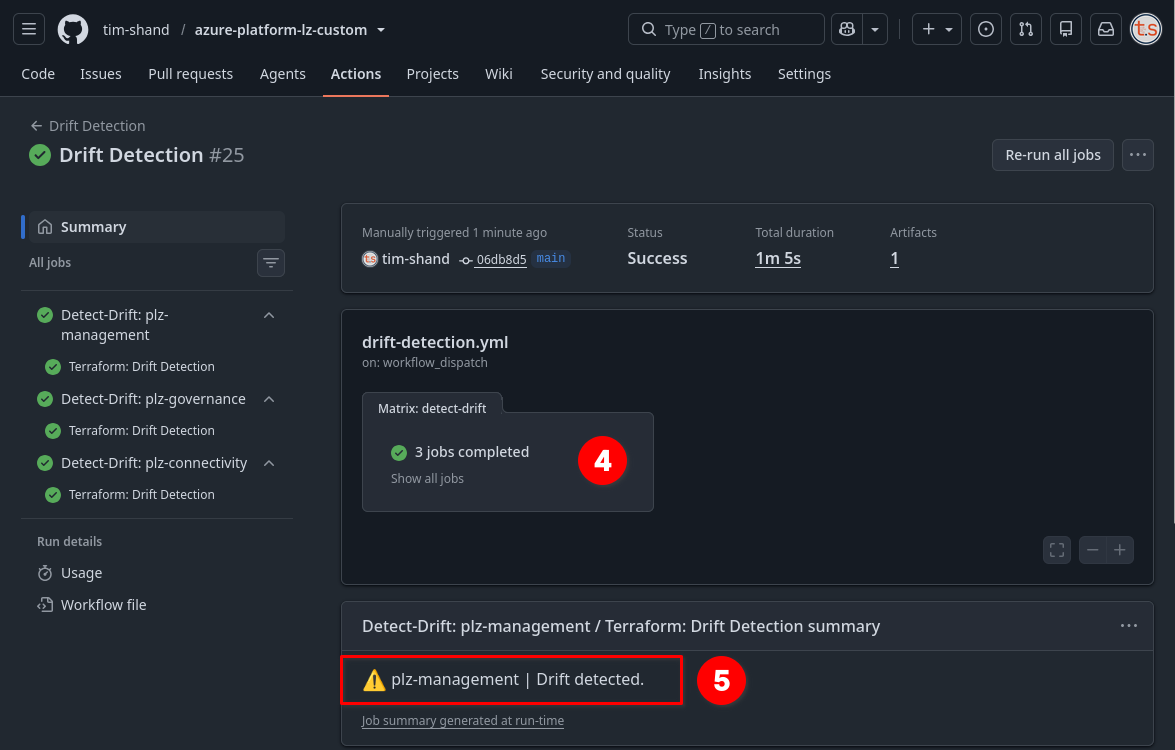
Drift Detectionworkflow in GitHub Actions. - Drift detection will run on all three environment simultaneously.
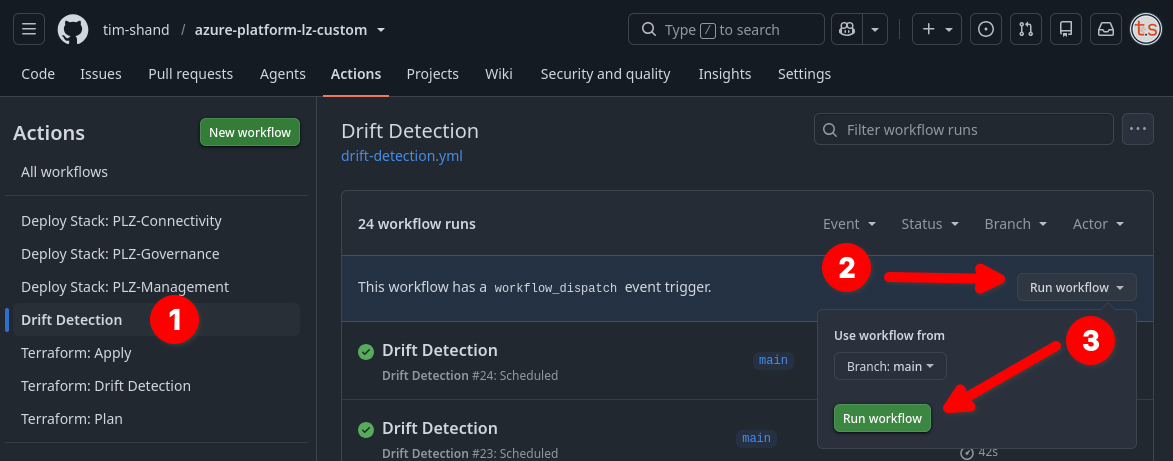
Once each run is complete, the results will be presented in the workflow summary. As expected, the workflow has detected that there is drift between what Terraform state believes to be true, and what is currently configured in Azure.
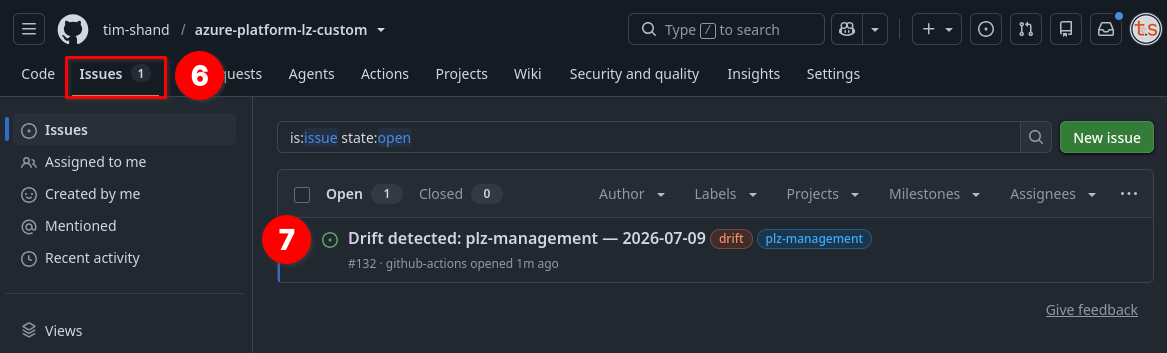
If drift is detected, a new GitHub Issue will be opened in the repo.
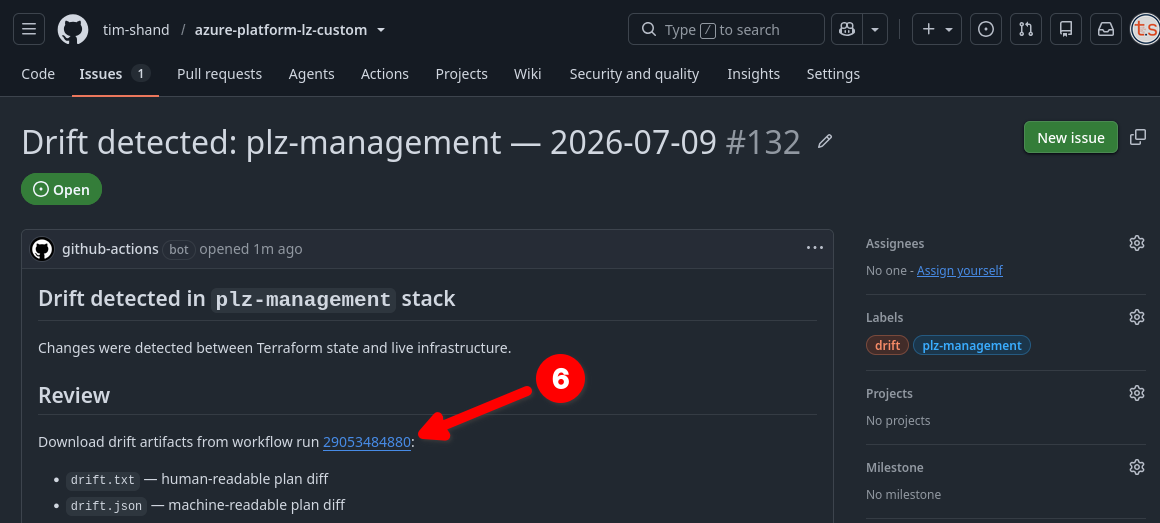
Clicking the link in the Issue will link back to the Drift Detection workflow.
Scroll down to the bottom of the summary section to locate the workflow artifact (file) for the environment where drift was detected.
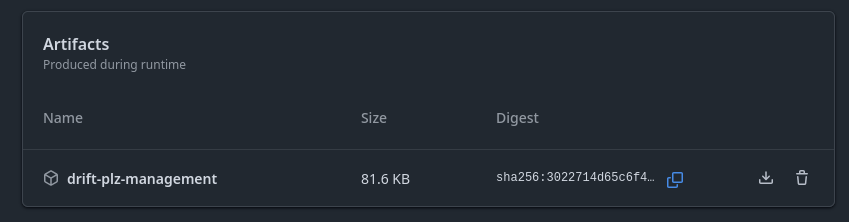
Open this archived file and review the contents of the files within. These will show the output of the Terraform plan command where drift was detected.
Terraform used the selected providers to generate the following execution
plan. Resource actions are indicated with the following symbols:
  + create
Terraform will perform the following actions:

  # azurerm_monitor_activity_log_alert.resource_health will be created
  + resource "azurerm_monitor_activity_log_alert" "resource_health" {
      + description         = "Fires when any resource in the management resource group becomes unavailable or degraded."
      + enabled             = true
      + id                  = (known after apply)
      + location            = "global"
      + name                = "alrt-tjs-plz-mgt-hth-res"
      + resource_group_name = "rg-tjs-plz-mgt"
      + scopes              = [
          + "/subscriptions/8cf80f38-0042-413a-a0ac-c65663dda28e",
        ]
      + tags                = {
          + "CostCenter"   = "Platform"
          + "CreatedBy"    = "IaC-Terraform"
          + "Deployment"   = "plz-management"
          + "Environment"  = "plz"
          + "Organization" = "TShandCom"
          + "Owner"        = "CloudOpsTeam"
          + "Project"      = "PlatformLandingZone"
        }

      + action {
          + action_group_id = "/subscriptions/8cf80f38-0042-413a-a0ac-c65663dda28e/resourceGroups/rg-tjs-plz-mgt/providers/Microsoft.Insights/actionGroups/ag-tjs-plz-mgt-platform"
        }

      + criteria {
          + category = "ResourceHealth"

          + resource_health {
              + current  = [
                  + "Degraded",
                  + "Unavailable",
                ]
              + previous = [
                  + "Available",
                  + "Unknown",
                ]
            }

          + service_health (known after apply)
        }
    }

Plan: 1 to add, 0 to change, 0 to destroy.
As we manually deleted the resource earlier, Terraform now wants to recreate it. If the main deployment workflow were to be run, either manually or by a PR trigger, the resource that was deleted will be recreated automatically.
- If the delete was intentional, this can cause frustration or confusion within teams as the resource will reappear on the next deployment run.
- If the delete was accidental, the resource will be recreated on the next deployment run, although any data it may have been holding could be lost.
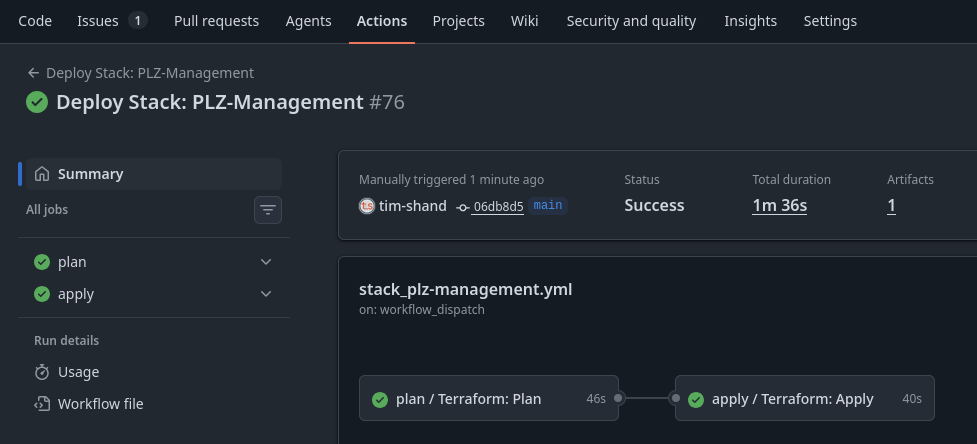
In this case, we will execute the stack deployment workflow manually to have it recreate the deleted resource.
Cover photo by Mitchell Luo on Unsplash with Terraform and GitHub image overlay.