

The Mysterious Case of Works Once, Then Fails#
Recently, my main laptop (Fedora Workstation 44) started exhibiting strange behavior when trying to access my home lab resources. Attempts to navigate the web management interfaces for Proxmox, OPNsense and the managed switch would initially load fine, followed by a failure to progress further into any menus or complete authentication. Reloading the web pages would result in timeout errors.
This was an intermittent failure to connect to lab network devices.
The Symptoms#
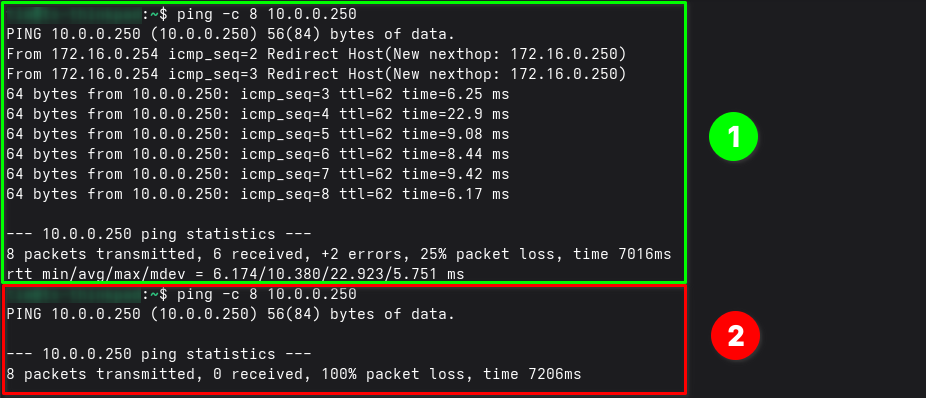
When I first opened a browser or ran a ping test to a lab device, it would work immediately.
- If I cancelled the ping and tried again, or reloaded the webpage, 100% of subsequent requests would fail.
- If I waited a while before retrying, the request would work again - only to fail again on the second attempt.
To reiterate:
- The first ping test from the laptop to lab switch works successfully.
- The second ping test fails for all transmitted packets.
Network Review#
Confused, I went through the process of troubleshooting, referring back to the OSI Model for reference. I decided to review the network configuration.
Laptop (172.16.0.10)
    |
ISP Router (172.16.0.254)
    |
OPNsense WAN: 172.16.0.250
    |
OPNsense LAN: 10.0.0.254
- Switch (LAN): 10.0.0.250- The laptop is connected to the home network (ISP router) via WiFi and has outbound Internet connectivity.
- The OPNsense firewall WAN interface is connected to my home network (ISP router), and receives an IPv4 address via DHCP reservation.
- A static route is configured on the ISP router, providing a pathway for WAN-side devices (laptop) to the lab network.
- The network address uses the subnet mask of
255.255.0.0(/16) to ensure that all VLANs and lab subnets will be directed via the OPNsense WAN interface.
After confirming the Fedora laptop had network connectivity, I rebooted for good measure.
- Confirmed network connectivity from laptop to wireless access point.
- Confirmed ICMP (ping) to:
- ISP router gateway address.
- OPNsense firewall WAN address (allowed by firewall rules).
It Works on my Computer#
Frustrated by the inconsistency, I grabbed a spare laptop I had running Windows 11. I connected to the same home wireless network and attempted to access the lab resources.
The Windows device worked flawlessly, every time. No page timeouts, no ping drops, no issues.

At least I now had a stable method of accessing OPNsense. I began to examine the OPNsense firewall logs, trying to identify anything that may be causing this issue.
The OPNsense logs showed traffic passing through the firewall successfully, yet the packets never seemed to return back to my Fedora laptop.
Dead Ends and False Leads#
Hypothesis 1: Firewall State Table
Perhaps the OPNsense state table was getting confused. Since the traffic worked once but not twice, maybe the state entry was corrupting after the initial handshake.
- Action: I reset all states on OPNsense (
Diagnostics > States > Reset All). - Result: The pattern returned straight away. This proved the issue wasn’t likely a stale state on the firewall.
Hypothesis 2: Client-Side Caching or ARP Issues
I suspected my Fedora laptop had a corrupted ARP cache or a stale route somehow.
- Action: I flushed DNS, reset network interfaces, and cleared ARP caches.
- Result: No change. The same behavior persisted.
Hypothesis 3: Outbound NAT Configuration
Could the “Disable Outbound NAT” setting in OPNsense be causing asymmetric routing? It was working fine for about a month up until today, so not likely to be the culprit, but worth checking.
- Action: I toggled OPNsense between “Disabled” and “Hybrid” NAT modes.
- Result: This did not appear to have any affect on the issue. Moving on.
The Smoking Gun: Wireshark Analysis#
Time to bring out the big guns.
To get to the bottom of this, I fired up Wireshark on the Fedora laptop, filtering for traffic to my lab switch (10.0.0.250). The capture revealed a sequence of events that seemed to display some interesting going-ons.
- Frame 65-68: The Fedora laptop sends a TCP SYN to the switch via the default gateway (172.16.0.254). The switch replies successfully.
- Frame 69 & 85: Immediately after the connection establishes, the ISP Router (172.16.0.254) sends an ICMP Redirect message “Redirect Host(New nexthop: 172.16.0.250)”
Ok, so what’s going on here?
- The router is telling the Fedora laptop: “You sent that packet to me, but you should have sent it directly to OPNsense (172.16.0.250). Don’t use me as a middleman anymore”.
- Frame 70-72: Fedora obeys the redirect. It performs an ARP request for 172.16.0.250 and updates its local routing table (presumably).
- Frame 86+: Fedora sends the next SYN packet directly to OPNsense MAC address, bypassing the ISP router.
The switch receives the packet and tries to reply. However, because Fedora updated its route to bypass the gateway, the return path breaks. The ISP router sees the reply coming from the wrong direction (or lacks the ARP context for the direct link), and silently drops it.
What does this mean?
- Fedora thinks it’s talking directly to OPNsense.
- The ISP router and the rest of the network think Fedora is still talking via the gateway.
- The mismatch is probably what’s causing the packet loss.
The Comparison#
Fedora Laptop#
I flushed the route cache to ensure we are working with a clean surface and remove any old entries.
# Flush route cache.
sudo ip route flush cache
sudo ip neigh flush all
Checked the current route from Fedora laptop to the switch IP in the lab network.
ip route get 10.0.0.250 && ip neigh showOutput:
10.0.0.250 via 172.16.0.254 dev wlp2s0 src 172.16.0.10 uid 1000
    cache
172.16.0.254 dev wlp2s0 lladdr 20:37:f0:9e:95:1d STALE
This result shows the route is going via the laptops default gateway (ISP router), with no ARP entry for the OPNsense firewall.
Ran a first ping test from laptop to switch in lab network.
ping -c 8 10.0.0.250Output:
PING 10.0.0.250 (10.0.0.250) 56(84) bytes of data.
64 bytes from 10.0.0.250: icmp_seq=1 ttl=62 time=25.6 ms
From 172.16.0.254 icmp_seq=2 Redirect Host(New nexthop: 172.16.0.250)
64 bytes from 10.0.0.250: icmp_seq=2 ttl=62 time=6.60 ms
From 172.16.0.254 icmp_seq=3 Redirect Host(New nexthop: 172.16.0.250)
64 bytes from 10.0.0.250: icmp_seq=3 ttl=62 time=21.7 ms
64 bytes from 10.0.0.250: icmp_seq=4 ttl=62 time=8.22 ms
64 bytes from 10.0.0.250: icmp_seq=5 ttl=62 time=7.28 ms
64 bytes from 10.0.0.250: icmp_seq=6 ttl=62 time=9.02 ms
The ping test shows the laptop gateway (ISP router) is replying with redirects, providing a next hop address. The subsequent pings are successful, even after receiving the redirects from the ISP router.
Checked for updated route from Fedora laptop to the switch IP in the lab network.
ip route get 10.0.0.250 && ip neigh showOutput:
10.0.0.250 via 172.16.0.250 dev wlp2s0 src 172.16.0.10 uid 1000
    cache <redirected> expires 287sec
172.16.0.250 dev wlp2s0 lladdr 00:23:24:f1:29:c7 STALE
172.16.0.254 dev wlp2s0 lladdr 20:37:f0:9e:95:1d REACHABLE
After the first ping test, there should be a new entry for 172.16.0.250 with a MAC address and state REACHABLE/STALE.
The route table shows the ICMP redirect from the ISP router is accepted, with an expiry for the updated route that decreases in value with each run of the command. The expiry of 287sec is the redirect exception TTL (time-to-live) and defaults to 5 minutes (300 seconds).
Ran a second ping test to check for any subsequent failures.
ping -c 8 10.0.0.250Output:
PING 10.0.0.250 (10.0.0.250) 56(84) bytes of data.
--- 10.0.0.250 ping statistics ---
8 packets transmitted, 0 received, 100% packet loss, time 7148ms
This shows that the redirect is accepted, but breakage only occurs on the next new connection attempt that performs a fresh route lookup. This explains why a single ping or HTTP session can partially succeed, then subsequent attempts just fail outright.
The failure is not immediate on first redirect, it’s on the next fresh route lookup.
Windows Laptop#
The working Windows laptop is not experiencing the same behaviour as the Fedora laptop. Exact same make and model, different OS.
Running a Wireshark capture on the Windows laptop shows that ping attempts to the lab switch result in the same redirects.
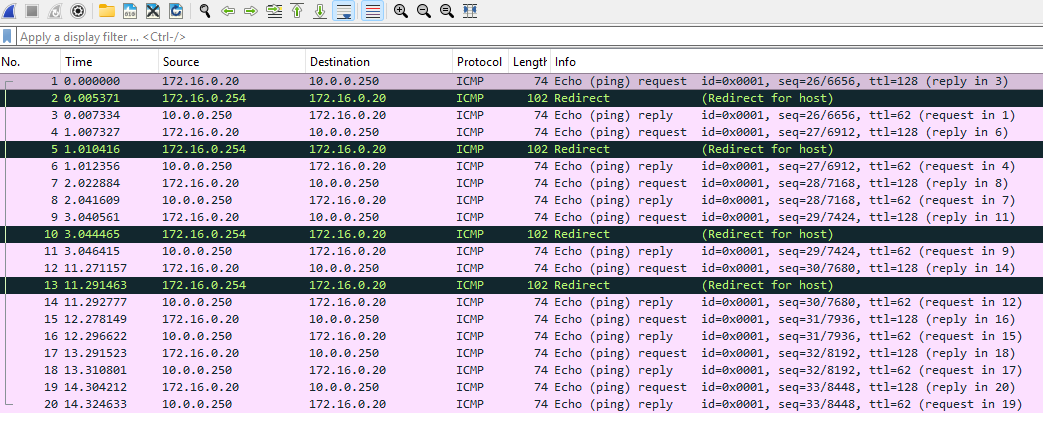
I performed a similar set of troubleshooting steps on the Windows device that I used with Fedora, starting with a ping test from Windows.
ping 10.0.0.250Output:
Pinging 10.0.0.250 with 32 bytes of data:
Reply from 10.0.0.250: bytes=32 time=28ms TTL=62
Reply from 10.0.0.250: bytes=32 time=5ms TTL=62
Reply from 10.0.0.250: bytes=32 time=14ms TTL=62
Reply from 10.0.0.250: bytes=32 time=95ms TTL=62
Ping statistics for 10.0.0.250:
    Packets: Sent = 4, Received = 4, Lost = 0 (0% loss),
Approximate round trip times in milli-seconds:
    Minimum = 5ms, Maximum = 95ms, Average = 35ms
The ping test is successful with no visual signs of ICMP redirects, unlike the Fedora laptop. Checking the route table, I found there was no entry for the lab network.
The command route print only displays the persistent/active routing table.
ICMP redirects are handled through a separate IP Next-Hop cache/Destination Cache that uses a per-destination nexthop override outside the main route table.
netsh interface ipv4 show destinationcacheOutput:
PMTU Destination Address                           Next Hop Address
---- --------------------------------------------- -------------------------
1500 10.0.0.250                                    172.16.0.254
Unlike the Fedora laptop, after receiving the ICMP redirects, the Windows laptop is not updating its route table. Windows received the redirect, but did not act on it.
Since this is a device I borrowed from work, it’s possible that it has been configured to ignore ICMP redirects intentionally - potentially a security guardrail. I did some research into where this might be configured in Windows:
Registry: HKEY_LOCAL_MACHINE\SYSTEM\CurrentControlSet\Services\Tcpip\Parameters\EnableICMPRedirect
Local Policy: Computer Configuration > Administrative Templates > Network > TCPIP Settings
Windows Firewall: No specific setting or policy enabled, although ICMP inbound is not enabled by default.
None of the usual areas where this might be configured produced any results or values.
I decided to check the local Windows Firewall logs for any indication of DROP entries.
After discovering that logging was disabled for all network profiles, I enabled the logging and ran the ping test again.
Now we are getting somewhere.
The Windows Firewall logs clearly shows inbound ICMP requests from the ISP router are being dropped.
# C:\Windows\System32\LogFiles\Firewall\pfirewall.log
2026-07-10 13:41:04 ALLOW ICMP 172.16.0.20 10.0.0.250 - - 0 - - - - 8 0 - SEND 4
2026-07-10 13:41:05 ALLOW ICMP 172.16.0.20 10.0.0.250 - - 0 - - - - 8 0 - SEND 4
2026-07-10 13:41:05 DROP ICMP 172.16.0.254 172.16.0.20 - - 88 - - - - 5 1 - RECEIVE 4
2026-07-10 13:41:05 DROP ICMP 172.16.0.254 172.16.0.20 - - 88 - - - - 5 1 - RECEIVE 6844
2026-07-10 13:41:06 ALLOW ICMP 172.16.0.20 10.0.0.250 - - 0 - - - - 8 0 - SEND 4
2026-07-10 13:41:06 DROP ICMP 172.16.0.254 172.16.0.20 - - 88 - - - - 5 1 - RECEIVE 4
2026-07-10 13:41:06 DROP ICMP 172.16.0.254 172.16.0.20 - - 88 - - - - 5 1 - RECEIVE 6844
2026-07-10 13:41:07 ALLOW ICMP 172.16.0.20 10.0.0.250 - - 0 - - - - 8 0 - SEND 4
2026-07-10 13:41:07 DROP ICMP 172.16.0.254 172.16.0.20 - - 88 - - - - 5 1 - RECEIVE 4
2026-07-10 13:41:07 DROP ICMP 172.16.0.254 172.16.0.20 - - 88 - - - - 5 1 - RECEIVE 6844- Type 8/Code 0 (Echo Request): Allowed outbound, as expected.
- Type 5/Code 1 (Redirect for Host): Dropped inbound, every single time, consistently, for the entire capture window.
The Verdict#
Root Cause#
My weird network topology + firewall behaviour + asymmetric routing.
- Fedora (firewalld):
- Allows inbound ICMP by default.
- Redirect reaches the kernel, the kernel accepts it, asymmetric routing breaks the connection.
- Windows Defender:
- Tracks the ping as an
Echo Request/Replyflow. - Unsolicited
redirectmessage arriving on that same flow doesn’t match the expected reply pattern. - Message is discarded by the firewalls default inbound policy.
- Tracks the ping as an
The Setup#
The ISP router sits between two networks:
- The home LAN (172.16.0.0/16).
- Nested lab network behind OPNsense (10.0.0.0/16).
A static route on the ISP router points lab-bound traffic at OPNsense’s WAN address (172.16.0.250). Because the ISP router considers itself unnecessary once it knows a more direct path exists, it sends ICMP Redirect (type 5) messages to clients telling them “don’t route this through me, go straight to OPNsense instead”.
That is standard router behaviour. The problem is what each client does with that instruction afterwards.
What Actually Happened?#
- The laptops send a packet toward the lab network via the default gateway (ISP router).
- The ISP router forwards it to OPNsense, then sends an ICMP Redirect back to laptops: “next time, go directly to 172.16.0.250”.
Fedora:
- The kernel accepts this by default, adding a nexthop override (visible as a
<redirected>exception on the route with a ~5 minute expiry). - The next packet in that flow goes directly to OPNsense, bypassing the ISP router entirely.
- But the return path is still built around the original asymmetric expectation.
- The ISP router and the rest of the network still expect traffic to flow back through it, not directly between the laptop and OPNsense.
- The reply gets lost, and the connection stalls.
Windows:
- The exact same redirect packet arrives at the NIC (confirmed in Wireshark) but Windows Defender Firewall drops it immediately.
- It is logged as
DROP ICMP ... type 5 code 1every time. - It never reaches the part of the IP stack that would act on it.
- The destination cache never updates, Windows keeps using the ISP router gateway for everything.
- The asymmetric path problem never has a chance to occur.
Next Steps#
I intend to add a new Wireless Access Point to a new VLAN in the near future to provide the “home” network. This will remove the need to enter the lab network via the OPNsense WAN address, and allow me to remove the static routing configuration on the ISP router. At that point, the ISP router would be used purely for NAT Gateway and Internet access.
The Fedora Work-Around#
Until the new home network equipment and VLAN are setup, the below workaround will resolve the issue. This process will force the Linux kernel to ignore ICMP redirect messages.
Run these commands in Fedora to disable redirect acceptance.
Replace wlp2s0 with your actual interface name if different.
Disable accepting ICMP redirects:
sudo sysctl -w net.ipv4.conf.wlp2s0.accept_redirects=0
sudo sysctl -w net.ipv4.conf.default.accept_redirects=0
sudo sysctl -w net.ipv4.conf.all.accept_redirects=0
Also disable secure redirects (a variation):
sudo sysctl -w net.ipv4.conf.wlp2s0.secure_redirects=0
sudo sysctl -w net.ipv4.conf.default.secure_redirects=0
sudo sysctl -w net.ipv4.conf.all.secure_redirects=0
Flush routes to force a clean slate:
sudo ip route flush cache
sudo ip neigh flush all
To ensure this survives a reboot, create a persistent sysctl configuration file:
sudo touch /etc/sysctl.d/99-no-icmp-redirects.conf
Edit the file and add the below:
# Prevent ICMP Redirect acceptance in nested network topologies.
net.ipv4.conf.all.accept_redirects = 0
net.ipv4.conf.default.accept_redirects = 0
net.ipv4.conf.wlp2s0.accept_redirects = 0
net.ipv4.conf.all.secure_redirects = 0
net.ipv4.conf.default.secure_redirects = 0
net.ipv4.conf.wlp2s0.secure_redirects = 0
Cover photo by Buddha Elemental 3D on Unsplash.