
Introduction#
This article provides the steps to create and publish a static website to Azure using Hugo. This method uses Infrastructre-as-Code tool Terraform to define and deploy the cloud resources, and implements the automated build and deployment using a GitHub Actions workflow.
At the time of this article, Azure Static Web Apps are free of charge under the free plan and come with valid SSL certificates at no cost. Azure Static Web Apps can be assigned custom domains via a 3rd-party vendor such as Cloudflare.
Note: This guide uses a custom domain name with DNS provided by Cloudflare, however this process can be used without a custom domain by removing the relevant variables and lines within the Terraform resource definitions.
What is Hugo?#
Hugo is a static site generator written in Go (Golang), known for it’s speed and flexible content structure It is widely used for producing blogs, documentation sites, portfolios, and marketing websites.
- Fast build times: Can generate thousands of pages in milliseconds.
- Single binary: No runtime or dependencies, just download and run.
- Powerful templating: Built-in Go-based template engine.
- Flexible content model: Organize content however you like (pages, sections, taxonomies).
I have used Hugo in the past for previous static websites and found it easy to work with. Like other SSGs, Hugo provides the capability to run a development server locally to preview your work before pushing into production.
What is a Static Site Generator?#
A Static Site Generator (SSG) is a tool that builds a website by generating static HTML files from source content and templates. Unlike dynamic websites that generate pages on-demand via server-side code (like Python or Node.js), static site generators pre-build the entire site at compile time. This means that the final output is a collection of static files (HTML, CSS, JS) ready to be served by a web server.
Many SSGs provide the capability to produce content in markdown format, converting that into HTML during the build process. This makes creating pages quick and easy for those of us who prefer working with markdown for note taking.
Alternatives#
- Jekyll
- Another popular static site generator written in Ruby, primarily used for creating blogs, documentation sites, and personal websites.
- Jekyll also the engine behind GitHub Pages, making it convenient for developers who host their sites on GitHub.
- 11ty (Eleventy)
- Written in JavaScript and designed for developers who want to build static websites with full control over structure, templating, and performance, without the overhead of complex frameworks.
- Astro
- Running on Node.js, Astro is designed for building fast, content-rich websites using a component-based architecture. Unlike some other SSGs that render everything at build time, Astro utilizes a “zero-JS by default” approach, which results in shipping as little JavaScript as possible to the client.
Project Requirements#
- Familiarity with command line, Git and development concepts.
- Check out this article on Git for more information.
- GitHub account and repository to conain the Hugo static website code.
- Existing Azure tenant and subscription.
- CLI Tools installed:
- Optional: Custom domain name.
- Optional: Cloudflare API token for DNS, see guide here.
Developing with Hugo Locally#
The section demonstrates how to use the locally installed Hugo application to create, build, and test the static site. Hugo provides a serve functionality that allows the site to be run locally and accessed by the web browser.
Install Hugo#
The first step is get Hugo installed. This process will vary depending on your choice of operating system.
Hugo can be installed on Windows, MacOS, Linux and BSD systems. For specific guidance for each OS, please visit the Hugo documentation for more details.
Windows#
# Install Hugo via Winget.
winget install Hugo.Hugo.Extended
Linux (Ubuntu, Debian)#
# Ubuntu, Debian
sudo apt install hugo
Linux (Fedora, RHEL)#
# Fedora, RHEL
sudo dnf install hugoMacOS#
brew install hugoCreating a New Project#
Create a new directory to house the project. This will be the root directory, containing the Hugo site files and other related files.
# Create new directory for the project and change into it.
mkdir my_website
cd my_website
Setup the project directory as a Git repository, and link to the corrosponding remote repository in GitHub.
# Initialize Git in current project directory and set branch as `main`.
git init -b main

# Add the GitHub repository as the remote source named `origin`.
git remote add origin https://github.com/user-name/my-website

# Pull down the existing remote repository (empty at this point).
git pull origin main
From inside the project directory, create a new Hugo site. The name can be anything. I use the name src as my sites are always subfolders of my primary project directory in GitHub.
hugo new site ./srcA message should be displayed advising a new site has been created.
Congratulations! Your new Hugo project was created in [path].Selecting a Theme#
Select a theme to use for the new site. A large number of themes can be found for free at Hugo Themes.
Option 1: Clone the theme repository to the themes directory:
Makes the theme part of your own repository, allowing complete customization.git clone https://github.com/dillonzq/LoveIt.git themes/LoveIt
Option 2: Make the theme repository a submodule of the current Git repo.
Keeps the theme linked to its original repository, allowing for easy updates and version tracking.git submodule add https://github.com/dillonzq/LoveIt.git themes/LoveIt
Depending on the theme chosen, there are changes required to me made in the src/hugo.toml file.
Most themes provide a directory named exampleSite containing a working example site ready to go. The contents of this exampleSite directory can be copied into your projects site folder for an easy quick start.
Example Files:
- Example Config:
my_site/themes/LoveIt/exampleSite/hugo.toml - Example Content:
my_site/themes/LoveIt/exampleSite/content - Example Assets:
my_site/themes/LoveIt/exampleSite/assets
Check with the specific instructions for use for the theme you have chosen. For this version of the theme LoveIt, I need to make the following changes configuration file and save.
title = "Test Site"
baseURL = "http://localhost"
theme = "LoveIt"
themesDir = "./themes"
Preview the Site#
It’s now time to start the Hugo server to view our new site.
Pass in the commandline switches:
-sto provide the source directory path to build from.-wto watch the site directory for changes and rebuild the site.
# Start Hugo local server.
hugo serve -s ./src -w
A local address (http://localhost:1313/) will be provided in the terminal. Copy this and paste it in your web browser to view the default page of the new site.
Built in 274 ms
Environment: "development"
Serving pages from disk
Running in Fast Render Mode. For full rebuilds on change: hugo server --disableFastRender
Web Server is available at http://localhost:1313/ (bind address 127.0.0.1)
Press Ctrl+C to stop
This allows you to review the site locally before pushing it into production.
Build and Deploy with Terraform#
This section defines the steps used to deploy the static Hugo site to Azure Static Web Apps using Terrform and GitHub Actions.
The following actions and resources will be created:
- Resource Group + Static Web App created in Azure.
- Optional: CNAME entry in Cloudflare DNS.
- Maps the default Static App DNS name provided by Azure to your chosen custom domain name.
- Read the deployment token from the created Azure Static Web App.
- Push the token directly into the GitHub repo as a secret.
- This can then be read in as a variable by a workflow later on.
Terraform Code#
The following Terraform files need to be created and populated. These can be stored within the project directory under a new directory named infra.
providers.tf: Define the Terraform providers and version configuration.main.tf: Primary configuration file for defining resources and logic.variables.tf: Declare input variables, defining the name and type.terraform.tfvars: This file contains variable value inputs, including potential secrets (API tokens etc).outputs.tf: Declares output values to display after terraform apply (IPs, connection strings).
providers.tf
terraform {
  required_version = ">= 1.5.0"
  required_providers {
    azurerm = {
      source  = "hashicorp/azurerm"
      version = "~> 4.0"
    }
    # OPTIONAL: Used for Cloudflare resources (DNS, domains, etc).
    cloudflare = {
      source = "cloudflare/cloudflare"
      version = "5.8.2"
    }
    # Used for generating time-based resources, used for timestamps in names or tags.
    time = {
      source = "hashicorp/time"
      version = "0.13.1"
    }
    # Used for GitHub resources, such as repositories, uploading secrets to Github Actions.
    github = {
      source  = "integrations/github"
      version = "~> 6.0"
    }
  }
}

# Provider configurations.
# These are the providers that will be used in the Terraform configuration.
provider "azurerm" {
  subscription_id = var.azure_sub_id # Replace the associated variable with your Azure subscription ID.
  tenant_id = var.azure_tenant_id # Replace the associated variable with your Azure tenant ID.
  features {}
}
provider "cloudflare" {
  api_token = var.cloudflare_config.api_token # Replace the associated variable with your Cloudflare API token.
}
provider "github" {
  owner = var.github_config.org_user # Replace the associated variable with your GitHub org/user.
}
outputs.tf
# Output the hostname assigned to the SWA.
output "swa_default_hostname" {
  value = azurerm_static_web_app.swa.default_host_name
}

# Deployment token to be used by GitHub Actions workflow to deploy the SWA in Azure.
output "swa_deployment_token" {
  value     = azurerm_static_web_app.swa.api_key
  sensitive = true # To view: terraform output -raw swa_deployment_token
}
variables.tf
### Variables ###

variable "azure_tenant_id" {
    type = string
    description = "Azure tenant ID, used for auth."
}

variable "azure_sub_id" {
    type = string
    description = "Azure subscritpion ID, used for resource deployment."
}

variable "location" {
    type = string
    description = "Default/preferred location for resource deployment."
}

variable "tags" {
  type        = map(string)
  description = "Tags to be applied to resources."
}

variable "naming" {
    description = "Map of values defining the naming conventions for resources."
    type = map(string)
}

variable "github_config" {
    description = "Map of values defining the GitHub configuration."
    type = map(string)
}

variable "cloudflare_config" {
    description = "Map of values defining the Cloudflare configuration."
    type = map(string)
}

variable "custom_domain_name" {
  type = string
  description = "OPTIONAL: Custom domain name to be used for the Azure Static Web App."
  default = "" # Example: "www.example.com". If left empty, the SWA will only have the default Azure hostname.
}
terraform.tfvars
# Azure
azure_tenant_id = "12345-abcd-1234-efgh-1234567890"
azure_sub_id = "12345-abcd-1234-efgh-1234567890"
location = "westus2" # SWA is limited to specific regions.
# Optional: Custom domain name to be used for the Azure Static Web App.
custom_domain_name = "www.website.com" # Example: "www.example.com". If left empty, the SWA will only have the default Azure hostname.

# Naming Conventions
naming = {                 # Map of name related variables.
    org_prefix       = "abc" # Organization abbreviated name. Example: "abc" (Azure Balloon Company).
    workload_project = "www-myapp-com" # Workload project, overall category or additional grouping name.
    environment      = "dev" # alz, plz, dev, tst, prd.
}

tags = {
    Organization = "MyOrg"           # Name or abbreviation used to identify the organisation.
    CreatedBy    = "IaC-Terraform"       # Name of the user or service that created the resources.
    Owner        = "My Name"          # Name of the individual or team responsible for the resources.
    Project      = "www-myapp-com" # Workload/project name, used to group and identify related resources.
    Environment  = "dev"                 # alz, plz, dev, tst, prd.
}

github_config = {
    org_user   = "my-account" # Name of the repository organization owner.
    repository = "www-myapp-com" # Repository where this project is stored.
    branch     = "main" # Name of the default repository branch.
}

# Cloudflare: https://developers.cloudflare.com/fundamentals/api/get-started/create-token/
cloudflare_config = {
  zone_id   = "1234567890" # Cloudflare zone ID for the custom domain.
  api_token = "123456789" # Cloudflare API token with permissions to manage DNS records.
  dnshost   = "www" # Subdomain to be used for the CNAME record, 'www' for www.example.com.
}
main.tf
### Main ###

# Azure: Resource group for the project.
resource "azurerm_resource_group" "main" {
  name          = "rg-${var.naming.org_prefix}-${var.naming.workload_project}-${var.naming.environment}"
  location      = var.location
  tags          = var.tags
}

# Azure: Static Web App
resource "azurerm_static_web_app" "main" {
  name                  = "swa-${var.naming.org_prefix}-${var.naming.workload_project}-${var.naming.environment}"
  resource_group_name   = azurerm_resource_group.main.name
  location              = azurerm_resource_group.main.location
  sku_tier              = "Free" # or "Standard"
  tags                  = var.tags
}

# Cloudflare: Add auto-generated SWA DNS name as CNAME record for custom domain check."
resource "cloudflare_dns_record" "record" {
  zone_id = "${var.cloudflare_config.zone_id}"
  name = "${var.custom_domain_name}"
  ttl = 60 # 60 seconds, can update later on.
  type = "CNAME" # Can be "A" or "TXT" depending on your setup.
  comment = "Azure - ${var.naming.workload_project} - Domain verification record" # Adds a comment for clarity.
  content = azurerm_static_web_app.main.default_host_name # Supplied by Azure SWA resource after creation.
  proxied = false # Required to be 'false' for DNS verification.
}

# Sleep while DNS propagates (it can take a few minutes).
resource "time_sleep" "wait_for_dns" {
  create_duration = "180s"
  depends_on = [
    cloudflare_dns_record.record
  ]
}

# Azure: Add custom domain to SWA, after waiting for DNS.
resource "azurerm_static_web_app_custom_domain" "swa_domain" {
  static_web_app_id = azurerm_static_web_app.main.id
  domain_name       = "${var.custom_domain_name}"
  validation_type   = "cname-delegation" # dns-txt-token
  depends_on = [
    time_sleep.wait_for_dns # Only deploy if this resource succeeds.
  ]
}

# GitHub Actions: Upload secret (deployment token) for the SWA.
resource "github_actions_secret" "swa_token" {
  repository      = var.github_config.repository
  secret_name     = "AZURE_SWA_TOKEN"
  plaintext_value = azurerm_static_web_app.main.api_key
}
Deploy to Azure#
By default, executing this Terraform code will perform the following actions:
- Install Terraform providers as defined in the
providers.tffile. - Produce a verbose plan of the intended deployment actions.
- Deploy resources as defined in the
main.tffile.
Ensure you are logged into Azure CLI as this current Azure session is leveraged by the Terraform executable.
# Authenticate to Azure via AzureCLI.
az login
Execute Terraform to initialize the working directory, installing any required providers, run the plan for review, before finally deploying resources as per configuration files.
Execute Terraform using the following commands:
# Initialize Terraform.
terraform init -upgrade

# Run a plan to review.
terraform plan

# Instruct Terraform to apply the configuration.
terraform apply
Output:
azurerm_static_web_app.swa: Still creating... [00m20s elapsed]
azurerm_static_web_app.swa: Creation complete after 21s [id=/subscriptions/123456-abcd-1234-abcd-1a2b3c4d5e6f/resourceGroups/abc-website-prd-rg/providers/Microsoft.Web/staticSites/abc-website-prd-app]

Apply complete! Resources: 2 added, 0 changed, 0 destroyed.

Outputs:

swa_default_hostname = "made-up-stuff-0c260881e.1.azurestaticapps.net"
swa_deployment_token = <sensitive>
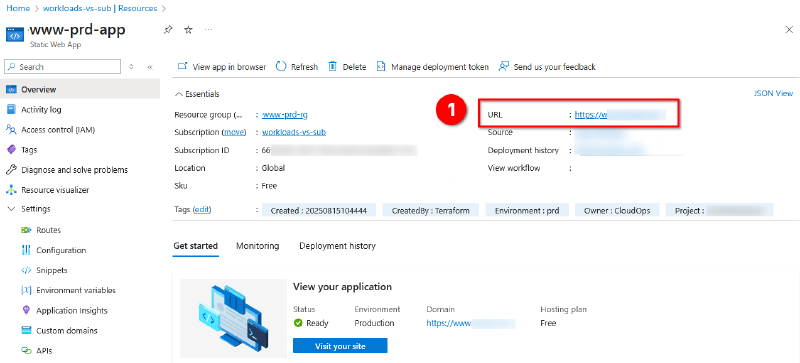
At this stage, you should now see the resources created in Azure under the subscription.
- Take note of the
URLaddress provided. This is the default address that can be used to access the web app.
Continuous Deployment with GitHub Actions#
GitHub Actions is a CI/CD (Continuous Integration and Continuous Delivery/Deployment) platform built into GitHub. It allows automation workflows directly in a repository, such as building, testing, and deploying code. Triggers can be based on events like pushes, pull requests, or scheduled triggers.
We have already configured Terraform to provision the Static Web App resources and push its deployment token directly into the GitHub Actions secrets within the repo. This removes the requirement to manually add the deployment secret to GitHub.
GitHub Actions Workflow#
This component is responsible for automating the build and deployment of the website, with steps defined in a YAML file.
During the previous manual deployment, we had already configured Terraform to provision the Static Web App resources and push the Azure Static Web App deployment token directly into the GitHub Actions secrets within the repo. This removes the requirement to manually add the deployment secret to GitHub.
The deployment token added in the previous section will be referenced and used by the YAML-based workflow.
Workflow Process:
- Checks out the GitHub repository.
- Installs Hugo.
- Builds site from
src/intopublic/. - Deploys to Static Web App using the deployment token stored as a GitHub Actions secret.
Example Workflow#
Create the below file hugo_build_azure_swa.yml and add it into the repository under .github\workflows.
name: Deploy Hugo site to Azure Static Web Apps

on:
  push:
    branches: [ "main" ]
  pull_request:
    types: [opened, synchronize, reopened, closed]
    branches: [ "main" ]

jobs:

  build_and_deploy:
    runs-on: ubuntu-latest
    if: github.event_name == 'push' || (github.event_name == 'pull_request' && github.event.action != 'closed')
    steps:
      # Checkout your repo
      - name: Checkout
        uses: actions/checkout@v4
      # Install Hugo
      # You can pin to a specific Hugo version here
      - name: Setup Hugo
        uses: peaceiris/actions-hugo@v2
        with:
          hugo-version: 'latest' # replace with latest stable if needed
          extended: true         # needed if using Hugo Pipes/SASS
      # Build the Hugo site
      - name: Build
        run: hugo -s ./src --minify
      # Deploy to Azure Static Web Apps
      - name: Deploy to Azure Static Web Apps
        uses: Azure/static-web-apps-deploy@v1
        with:
          action: upload
          azure_static_web_apps_api_token: ${{ secrets.AZURE_SWA_TOKEN }}
          # app_location is where your Hugo config.toml is
          app_location: "/src"
          # No API folder for Hugo static site
          api_location: ""
          # output_location is Hugo's public/ directory
          output_location: "public"

  close_pull_request_job:
    if: github.event_name == 'pull_request' && github.event.action == 'closed' # Close pull request, if PR was the trigger.
    runs-on: ubuntu-latest
    name: Close Pull Request Job
    steps:
      - name: Close Pull Request
        id: closepullrequest
        uses: Azure/static-web-apps-deploy@v1
        with:
          app_location: ""
          action: "close"
          azure_static_web_apps_api_token: ${{ secrets.AZURE_SWA_TOKEN }}
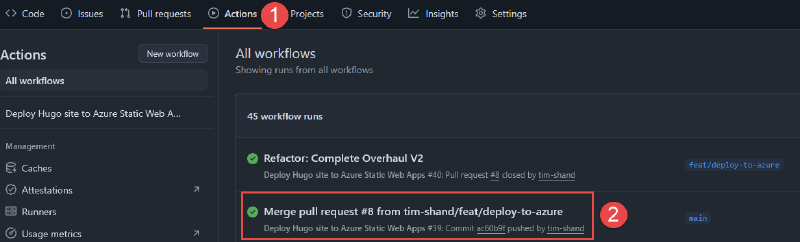
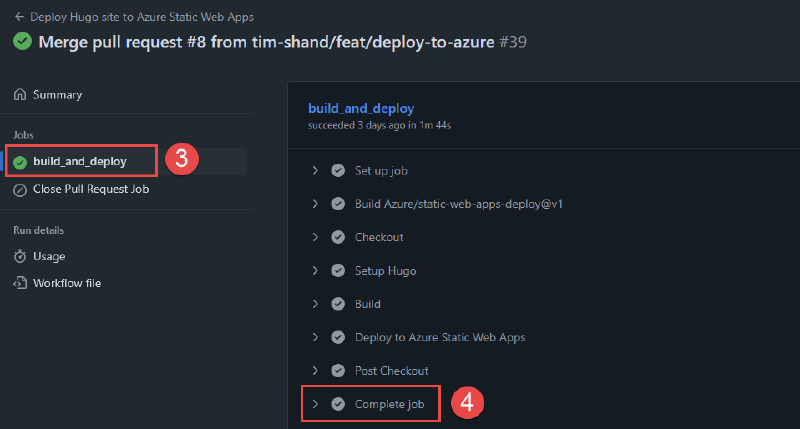
This workflow will run the Hugo site build process and deploy the generated website code to the Azure Static Web App using the deployment token generated during the Terraform deployment process.
Final Steps & Testing#
With the website codebase and GitHub Actions workflow now committed to the repository, whenever future commits or pull requests are merged, the Hugo deployment process will be initiated.
This will re-build the Hugo static site from the /src directory, with the output stored in the /public directory. The contents of the /public directory are what will be published to via the Azure Static Web App.